2026 · 11 · 20 · Day 75 · AI
I just want to write. So I built an agent to do my publishing chores.

Quick housekeeping: I'm running a small Write Club session on 18 December 2026, Friday, 10 am to 12:30 pm SGT. 5 to 10 of us will sit together, online, to think and write. Let me know if you are interested.
I just want to write. So I built an agent to do my publishing chores.
After publishing An honest look at my messy father-founder life, I received a message from a friend (lightly edited):
Read your latest post. Oh man, you've managed to put many of your other posts as backlinks. It looks like it was all "planned". 13 of your previous posts in the latest post. Find it impressive.
For years, I have been searching for the right content management system to use. I have tried WordPress, Ghost, and Webflow. It turned out I was searching for the wrong thing. What I needed was not a platform that lets me tag, cross-link, schedule, and distribute content easily. What I needed was a platform that can do all those (and more) for me.
I just want to write. But to publish an article online, I also need to deal with all those administrative tasks (what some people call content ops). As a solo founder with two kids who wants to publish regularly, I needed something to help me.
So I made myself an agentic CMS. I write while it takes care of the chores.
I have been using it to publish every day for 75 days now.
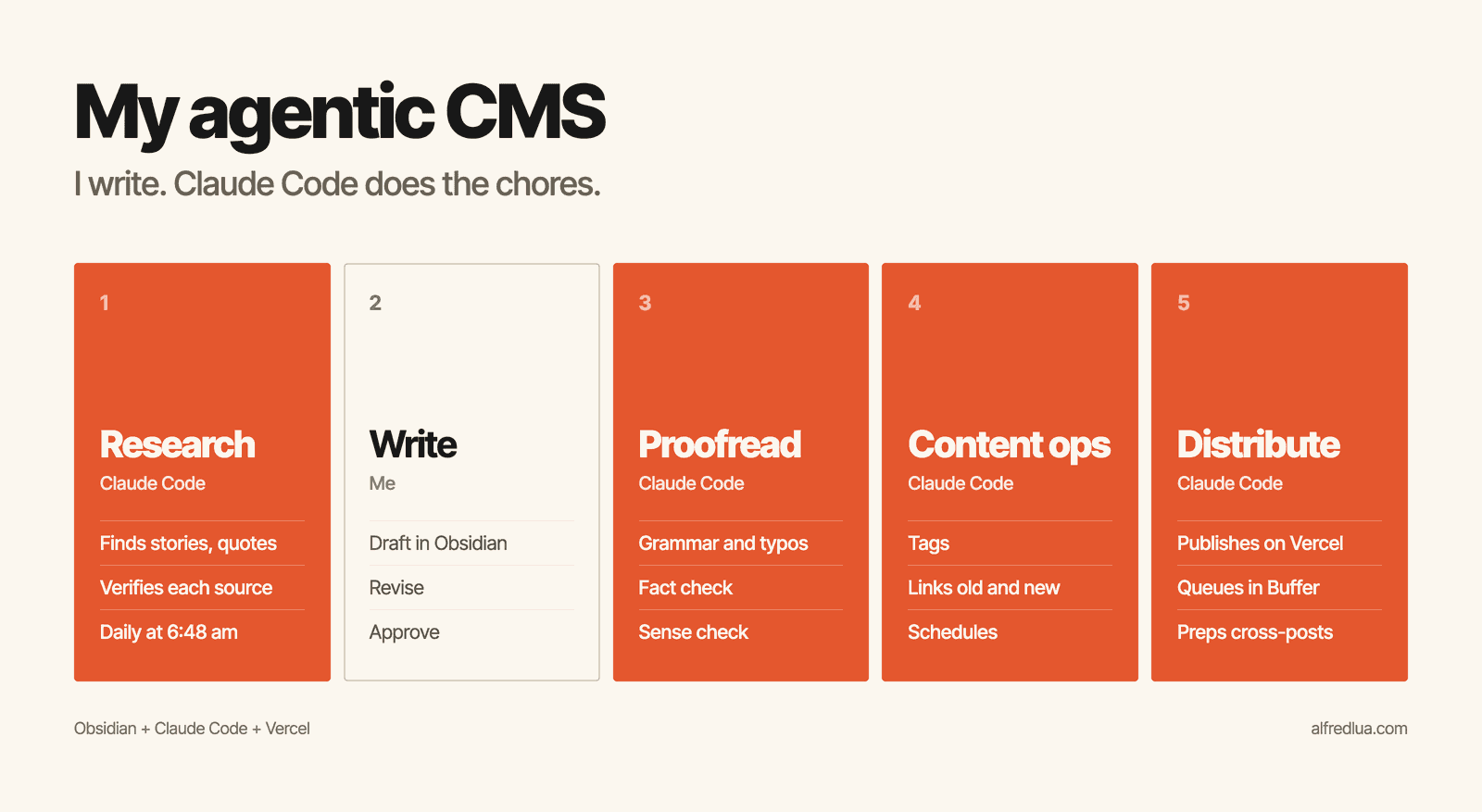
Obsidian + Claude Code + Vercel = Agentic CMS
This is what I do: Write.
This is what my CMS does: Research, proofread, fact check, sense check, tag, link, schedule, and distribute.
Here's a quick overview:
- Research: Every morning at 6:48 am, Claude Code automatically finds me three verified stories and quotes and why they matter.
- Proofread: After I finish my first draft, I bounce it back and forth with Claude Code. It checks my drafts for grammar, typos, factual errors, and logic.
- Content ops: When the draft is finalized, Claude Code adds backlinks to old articles and forward-links from old articles, adds relevant tags, and schedules it on my content calendar.
- Distribute: When the piece is ready, a script creates and pushes social posts to Buffer and my content calendar gives me rich text to copy and paste to Substack, Medium, and Facebook.
0. My setup
For storing ideas and writing drafts, I use Obsidian. It gives me a nice interface to edit Markdown files, and because I pay for iCloud+, my files sync between my laptop and phone.
For the "agentic" side of my CMS, I use Claude Code with my website repo and my Getting Things Done (GTD) repo. The former is where my published articles go while the latter is where I have a content calendar. I set up a bunch of skills for all the steps I want it to do for me (more below).
For my website, I use Next.js and Vercel. This is a bit of a happy coincidence. I built my website by following Lee Robinson's YouTube videos and have been using MDX files for my articles. This makes it easier for Claude Code to "publish" my Markdown notes in Obsidian as articles on my website, compared to using WordPress or Ghost, since it's just all Markdown files.
1. Research
The easiest way to get writer’s block is to start writing without any preparation. You just look at the blinking cursor and try to think of what to write on the spot. Of course nothing comes out.
To prevent that, besides my usual reading, I set up a scheduled task in Claude to research three verified stories or quotes about life, writing, and practical wisdom and tell me why they are relevant to me. It uses the web search tools and judges how credible each source is, instead of simply relying on its training knowledge, which is sometimes incorrect. It also automatically updates its memory so it doesn’t repeat the same stories and quotes. I have found that Sonnet 5.5 is good enough for this task.
Every morning, if I don't already know what I want to write, I go through the day’s research. If there is good material, I use it and start writing immediately. If more than one is good, I move the extras into Obsidian, a page for each. If none of them are good, I go through the backlog of ideas in my Obsidian. I usually still have to dig further into each story or quote after I have decided to use it. But the key is I don’t have to start with a blank mind. Also, I don't have to start my day with open-ended research, which is very distracting.
2. Proofread
When I was at Buffer, my teammate Ash always gave me feedback on my drafts. At Pebblely, it was my cofounder, SK. I have missed that since working alone. People say that AI can never replace a human editor, but there are many things AI editors can already do better than humans: Immediately finding grammatical errors and typos, researching online and verifying facts and claims, and telling me almost instantly if anything doesn’t make sense.
Most of Claude's writing suggestions are still rather terrible, but they have helped me get unstuck by giving me a few variations to consider. A common experience is like this: Ah these two suggestions are so silly. But you know what, I should write in this third way. Also, the quality of suggestions has improved a lot since I used GPT-3 to build Alfie, my AI content editor, in 2022.
I have a proofreading skill in my GTD folder. Whenever my first draft is ready, I’ll drop it in Claude Code and ask it to proofread. I usually revise my draft five to 10 times before I finalize it. It’s practically impossible to get so many rounds of feedback within a day from a human editor who also has other work to do. Of course, I’d still love to have human feedback, especially on the softer and less verifiable parts of my drafts, but this is (way) better than nothing.
3. Content ops
This is my least favorite part of writing, and thankfully Claude Code has been able to handle these really well for me: Tagging, linking, and scheduling.
For tagging and linking, I first got it to read all my previous articles and create an index. It is essentially a Markdown file with each article’s title, date, tags, summary, and keywords. It looks like this for my recent newsletter, I feel like I'm not supposed to enjoy parenting. But I do.:
newsletter | enjoy-parenting | 2026-11-13 | I feel like I'm not supposed to enjoy parenting. But I do. | joy, perspective, finite time | A childless friend concluded having a kid sounds "net negative but still worth it", and Alfred realized parents feel they must only complain; he admits the hard nights of solo-parenting while his wife worked night shifts, but argues parenting can be both hard and enjoyable, like his triathlons and startups. | enjoying parenting, complaining culture, Instagram parenting memes, solo parenting, night shifts, paradoxes, hard and enjoyable, deciding whether to have kids; Nat Eliason "having kids easier", triathlons, startups, miserable events fond memories, hanging up my bike
With the content index, Claude Code can give every new article three relevant tags and add backlinks to and forward-links from related old articles. I had to specify some rules around the tags so that Claude Code doesn’t apply too generic tags or create too many new tags. Finding the right level of specificity is more art than science.
For linking, Claude Code adds the links for me but I can veto if I want to. I have rules that prevent it from changing the words in the linked articles. This has worked surprisingly well. For instance, when working on a new draft this week, it noticed that I had written about the same personal story in a 2015 article. It asked me if the overlap was intended, and it decided to link the two because the two articles used the same story for different purposes.
For scheduling, I had separately created a (local) content calendar in my GTD repo to visualize my publishing schedule.
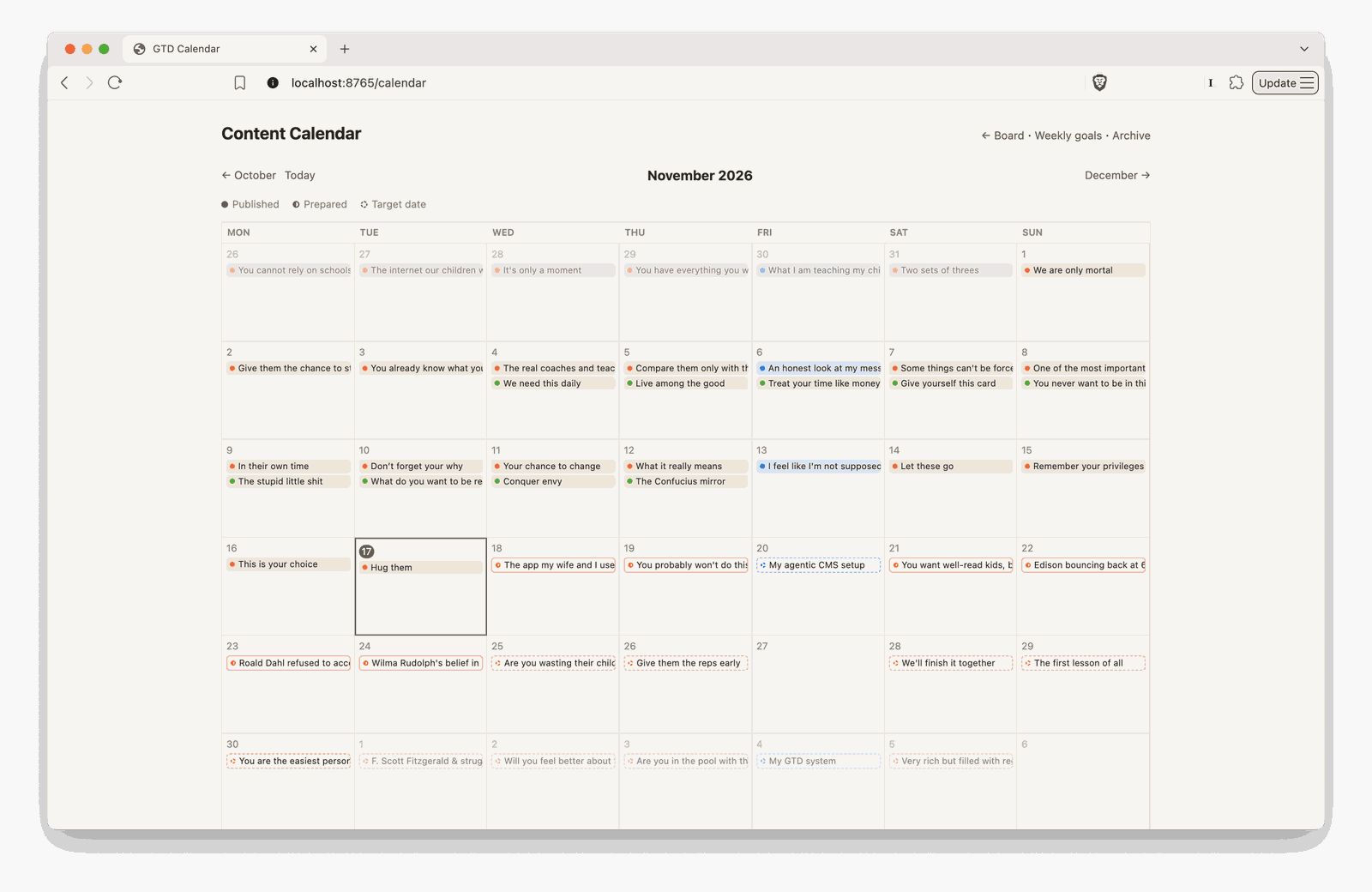
I write in bulk and have several pieces ready for the next few weeks. What scheduling means here is to find a suitable date to publish the current draft. Sometimes it is straightforward: The next available date. But sometimes it’s more complicated. For example, I don’t want to publish two articles on the same topic on consecutive days. Claude Code can tell when two pieces are too close in theme and reshuffle them if needed.
Here's an actual message from Claude Code when it scheduled an upcoming article:
Date: Monday 2026-11-30, 8am. That’s the first free daily slot. 11-26 to 11-29 are taken, and Friday 11-27 is for the newsletter. Its theme is forgiving yourself for past mistakes and getting better, which is a light piece. The two days before it are Feynman on fooling yourself (11-28) and Fitzgerald on struggling toward a good life (11-29). They’re related but not the same theme, so I didn’t move anything.
I have also been using Claude Code to help fill out information that it knows better than I do: For You probably won't do this, I have a sentence about my writing streak. Instead of calculating it myself, I simply wrote "It's why I have published every day for X days." When Claude Code scheduled it for 19 November 2026, it calculated the streak for that day and replaced X with 74 for me.
4. Distribute
While I don’t want to scroll social media, I unfortunately still rely on social media for distribution because my newsletter list is tiny. I used Claude Code to write a script that creates social media posts with the article’s title, description or content, and images if any, in Buffer. For Instagram, the script creates an image carousel that matches my website style. Whenever a PR is merged to publish an article, the script runs automatically to fill up my Buffer queue.
Posting just the title and description/text/link doesn't always work well on social media, but at least I have a simple automation now. Also, some posts performed better than I had expected. I’m experimenting with an upgrade right now by giving Claude Code reusable assets to create social media posts with my words. I will share more when I have some results!
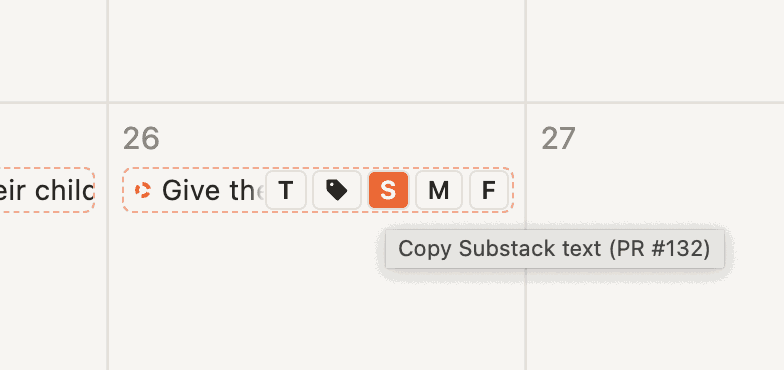
I also syndicate to Substack (which I use for emailing), Medium, and Facebook (which doesn’t have an API for personal profiles). To let me easily copy the rich text of a draft and paste it in those platforms, I added some buttons on my content calendar. It now takes me about 10 to 15 minutes to add and schedule a week of articles on those three platforms.
One non-obvious advantage is that I can programmatically add UTMs to links, which are different on every platform and an absolute hassle to do manually. Now it's all done for me.
Building towards an AI writing editor
My agentic CMS isn't fully autonomous yet. I still have to write (which I want), edit (which I also want), and manually syndicate to other platforms (which I don't want).
Overall, I'm pretty happy with where it is today.
But I also want to see how much further I can push it. I'm currently testing an "editor" agent. It has two main parts:
- Since Claude Code has all my draft revisions and comments, it can pull patterns and lessons from our proofreading conversations into a constantly evolving "lessons" document.
- When an article does well, I share the results and my analysis with Claude Code. It can then compile another constantly evolving "wins" document.
With these two documents, the "editor" agent can give me better personalized feedback on my drafts.
But writing is very much a tacit knowledge skill. Claude and other AI models in general still lack taste. Without specific guidance, they apply all the lessons and rules to every draft. It becomes unbearable because every draft is different and not every rule applies every time. Expert writers know when some rules don't apply and when some rules should be broken. I have been prompting it to do that but it's still early to tell if it's working. I'll report back!
Any questions about my CMS? Want to set up something similar for your writing? Let me know!
This week’s daily posts
- Day 69: Let these go
- Day 70: Remember your privileges
- Day 71: This is your choice
- Day 72: Hug them
- Day 73: The app my wife and I use >20 times a day
- Day 74: You probably won't do this
If you want to get a post in your inbox every day, update your subscription settings here.
Want to come back to this later?Keep it in your digital commonplace book.
Save to Fernsage